
Zeroing sheet guide
What is a zeroing target, and how does it work?
A zeroing target is a paper target with a clear aiming mark, used to compare where a shot group lands with where you aimed at a chosen distance. Comparing the group's approximate centre with that point of aim shows the horizontal and vertical offset.
The click-scaled zeroing grids on PDF Targets use your target distance and your scope's stated click increment to calculate the spacing. Each grid interval represents one nominal scope click at that distance, so you can read the offset in clicks as well as in millimetres or inches.
Create your own zeroing target
Compare the point of impact with the point of aim
For this worked example, the target distance is 25 metres and the scope's stated increment is 0.1 MRAD per click. Each grid interval represents one nominal click and measures 2.5 mm on a correctly scaled printout.
Each aim point gives you a reference on the shared grid. The first illustration shows a three-shot group's approximate centre relative to an aim point. The centre is four grid intervals left and three below the point of aim:
- Horizontal offset: 4 intervals × 2.5 mm = 10 mm left.
- Vertical offset: 3 intervals × 2.5 mm = 7.5 mm below.
The labels describe the observed group offset of four nominal clicks left and three down. Follow your scope manufacturer's instructions for adjustment direction and procedure.
The second illustration shows a new group centred near the unchanged point of aim after scope adjustments to account for the horizontal and vertical offset. The faded dots show the earlier group, and the dashed arrow compares the two group centres. This is an illustration of how to read the grid, not a measured test or a promised adjustment result.


These diagrams explain the grid. To print a target, download your configured PDF.
MOA and MRAD grid spacing by distance
Each value shows the calculated spacing between adjacent grid lines at the listed distance and click setting. Choose millimetres or inches, or select a linked value to open a matching target.
For other distances, enter your settings directly in the generator.
Show grid spacing in
Scroll the table sideways to see every click value.
| Distance | 0.05 MRADmm/click | 0.1 MRADmm/click | 0.1 MOAmm/click | ⅛ MOAmm/click | ¼ MOAmm/click | ½ MOAmm/click |
|---|---|---|---|---|---|---|
| 10 yd | 0.46† | 0.91 | 0.27† | 0.33† | 0.66 | 1.33 |
| 10 m | 0.50 | 1.00 | 0.29† | 0.36† | 0.73 | 1.45 |
| 25 yd | 1.14 | 2.29 | 0.66 | 0.83 | 1.66 | 3.32 |
| 25 m | 1.25 | 2.50 | 0.73 | 0.91 | 1.82 | 3.64 |
| 50 yd | 2.29 | 4.57 | 1.33 | 1.66 | 3.32 | 6.65 |
| 50 m | 2.50 | 5.00 | 1.45 | 1.82 | 3.64 | 7.27 |
| 100 yd | 4.57 | 9.14 | 2.66 | 3.32 | 6.65 | 13.30 |
| 100 m | 5.00 | 10.00 | 2.91 | 3.64 | 7.27 | 14.54 |
| Distance | 0.05 MRADin/click | 0.1 MRADin/click | 0.1 MOAin/click | ⅛ MOAin/click | ¼ MOAin/click | ½ MOAin/click |
|---|---|---|---|---|---|---|
| 10 yd | 0.018† | 0.036 | 0.010† | 0.013† | 0.026 | 0.052 |
| 10 m | 0.020 | 0.039 | 0.011† | 0.014† | 0.029 | 0.057 |
| 25 yd | 0.045 | 0.090 | 0.026 | 0.033 | 0.065 | 0.131 |
| 25 m | 0.049 | 0.098 | 0.029 | 0.036 | 0.072 | 0.143 |
| 50 yd | 0.090 | 0.180 | 0.052 | 0.065 | 0.131 | 0.262 |
| 50 m | 0.098 | 0.197 | 0.057 | 0.072 | 0.143 | 0.286 |
| 100 yd | 0.180 | 0.360 | 0.105 | 0.131 | 0.262 | 0.524 |
| 100 m | 0.197 | 0.394 | 0.115 | 0.143 | 0.286 | 0.573 |
† marks combinations below the current 0.5 mm minimum grid spacing; these have no sheet link. Linked examples use US Letter for yards and A4 for metres, with five square points of aim. You can change those settings in the generator. Values are calculated; check the printed scale before using the grid.
Create a zeroing grid for your own setup
Choose your distance, scope click value and layout, then preview and download your PDF.
Free to use. No account required. A4 and US Letter.
Use your own distance
You can enter a whole-number distance in metres or yards, including distances outside the table above. For example, open a grid for 17 metres with 0.1 MRAD clicks, then change the settings to match your setup.
Match your scope's click value
Check your scope's turret markings or manual. Choose from:
- MRAD: 0.05 or 0.1 per click, labelled 1/20 MIL (0.05 MRAD) and 1/10 MIL (0.1 MRAD) in the generator.
- MOA: 1/10, 1/8, 1/4 and 1/2 MOA per click.
The grid uses the stated click value; it does not verify your scope's actual movement. Follow the manufacturer's adjustment instructions.
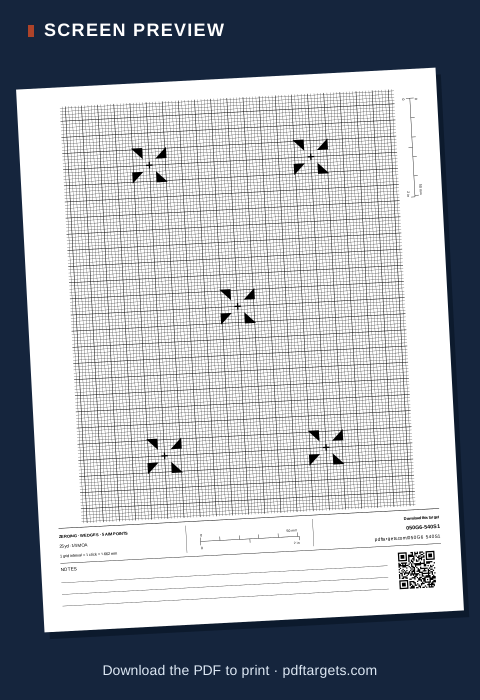
25-yard ¼ MOA zeroing target
A US Letter sheet with five wedge aim points and calculated grid spacing of about 1.66 mm.
Open the 25 yd · ¼ MOA sheet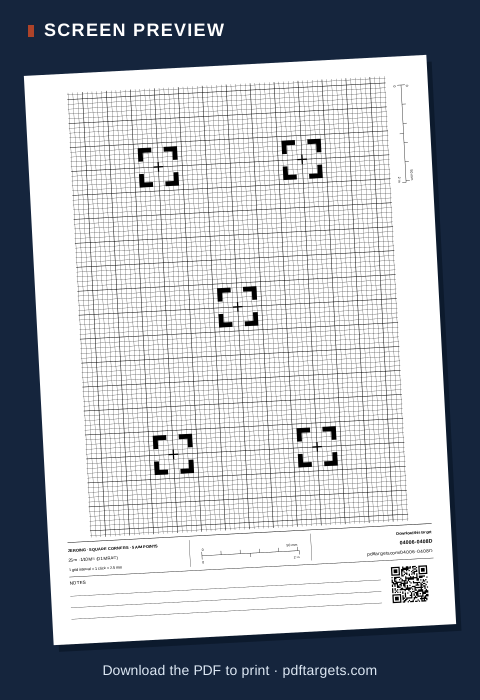
25-metre 0.1 MRAD zeroing target
An A4 sheet with five square aim points and calculated grid spacing of 2.5 mm.
Open the 25 m · 0.1 MRAD sheetScreen previews only. Open a target to customise it and download the PDF.
How to create and print your zeroing target
- Enter your distance. Open the zeroing target generator. Under Target distance, enter your whole-number distance and select Metres or Yards.
- Match your scope. Choose the value specified for your scope under Scope click increment.
- Customise the layout. Choose square corners, diamonds or wedges for the aim marks, and select the number of aim points. Pick A4 or US Letter paper and portrait or landscape orientation. Check the preview before downloading. If the grid is too fine or the layout cannot fit, the generator will flag the combination.
- Download your target PDF. Select Download PDF and open the downloaded file. Print the PDF itself, rather than the webpage or a screenshot.
- Print at the intended size. Match the PDF's paper size and orientation in your printer settings. Choose Actual size or 100% and turn off Fit, Shrink and borderless expansion. Print one copy, then check the scales below before printing more.
Check the printed scale
Printer settings can change the physical size of your target. Before using the printed grid, measure the horizontal and vertical verification scales with a ruler.
On each scale:
- From the zero tick to the 50 mm tick must measure 50 mm.
- From the zero tick to the 2 inch tick must measure 2 inches.
Measure between the ticks, rather than across the full artwork. Check both directions because a printer can stretch one axis differently from the other.
If either scale is wrong, check the paper size, orientation and scaling settings, then print and measure again. Both verification scales must match their labelled lengths before you rely on the grid.
Read the printing and scale-checking guide.
Frequently asked questions
Are the printable targets free?
Yes. You can customise and download a zeroing target PDF without paying or creating an account.
Can I enter a distance with decimal places?
The generator currently accepts whole-number metres or yards. Distances such as 12.5 metres are not supported, so check that your intended distance can be entered exactly.
Can I return to the same settings later?
Yes. Save your downloaded PDF to print the same file again. To edit the settings later, use Load short code and enter the code printed on the sheet. Check the preview, as a generator update may change the layout produced from an older code.
Create your target
Looking for other layouts? Browse our printable targets.