
Practice target guide
Printable airgun pellet-testing target sheet
Put separate groups on one sheet so you can see which shots belong together. Start with 20 equal-sized ring targets on A4, or change the rows, columns and paper to suit your session.
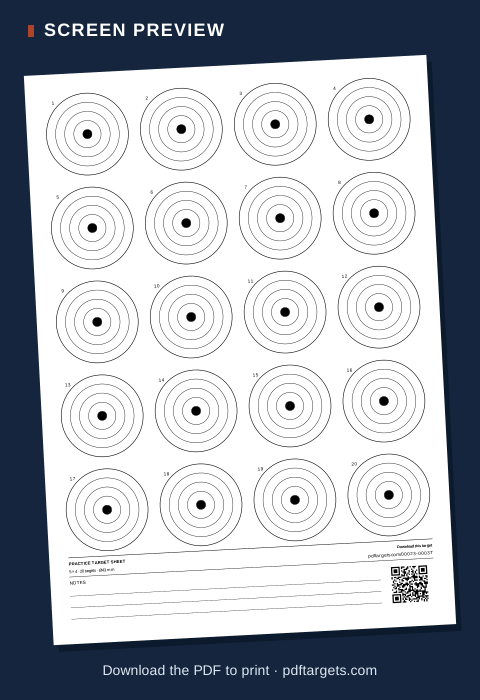 Open the 20-target pellet-testing sheet
Choose a layout you can keep track of
One target per group makes it easier to keep groups separate on the page. The 5 × 4 example provides 20 points of aim; if those targets are too small for your use, choose fewer rows or columns in the generator. The rings scale to fit the selected layout, so a four-target sheet has larger rings than a 20-target sheet.
Choose A4 or US Letter and portrait or landscape before downloading the PDF. The linked example starts on A4; after opening it, you can change the paper and layout without needing a different template.
Label groups as you go
- Decide which numbered target corresponds to each pellet or group before you start.
- Write the printed target number and pellet name or identifier in the sheet's notes area or in a separate record. Add any conditions you want to compare later, such as distance and group number.
- Keep that mapping with the printed sheet. If you use more than one sheet, identify the sheets as well.
A simple record might read “sheet 1, target 3 — pellet B — second group.” The sheet gives you separate aim points; it does not measure group size or decide which pellet is best.
Print the PDF, not the webpage
Use Download PDF, select the same paper size in the print dialog, and print at Actual size or 100%. These are general-purpose practice rings, not regulation air-rifle scoring faces. For more printing detail, see how to print a target PDF at actual size.
Create your pellet-testing sheet
Looking for another layout? Compare practice target examples.